
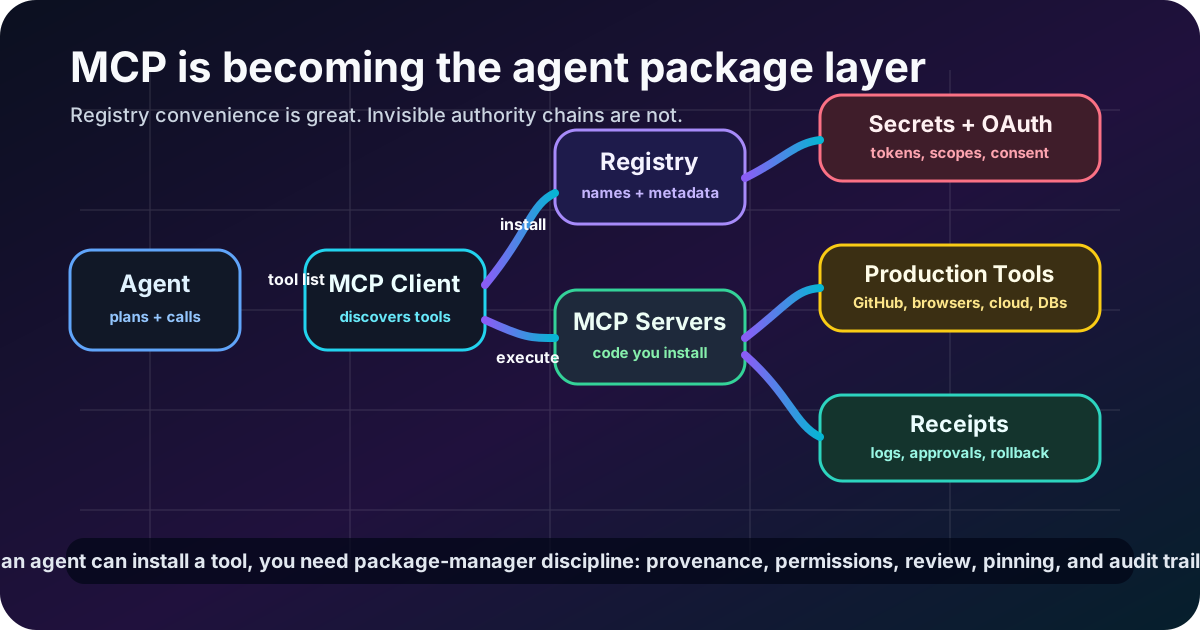
The Model Context Protocol started as a clean answer to an annoying problem: every AI app needed its own bespoke way to connect to tools, files, browsers, APIs, and internal systems.
Now it is becoming something bigger and messier.
MCP is turning agent capabilities into installable packages.
That is good. It means agents can discover tools, swap integrations, and move across clients without every team rebuilding the same connector soup. It is also dangerous as hell, because “install this MCP server” is starting to mean “let this code sit between a model and the systems you care about.”
That is npm-shaped power.
So treat it like npm-shaped risk.
Source freshness check: this post was checked on 2026-06-15. The official MCP registry repository showed activity on 2026-06-10 and describes itself as a community-driven registry service for MCP servers. The official MCP Python SDK showed activity on 2026-06-12. GitHub’s MCP server showed activity on 2026-06-12, Microsoft’s Playwright MCP server showed activity on 2026-06-10, and Docker’s MCP Gateway showed activity on 2026-06-12. On the client side, Claude Code, Gemini CLI, and OpenAI Codex all showed fresh June 2026 activity. The claim here is not old hype: the agent-tool layer is actively moving right now.
Tool installation is becoming product surface
The old devtool question was: “Does this app integrate with GitHub?”
The new agent question is: “Which MCP servers can this agent install, discover, and call while doing work?”
That difference matters.
A normal integration is usually configured by a human in a settings page. An MCP-powered agent stack can expose a whole catalog of capabilities into a planning loop: repo operations, browser automation, issue management, cloud APIs, databases, docs, memory, observability, local files, screenshots, deployment systems, and whatever else someone wraps tomorrow.
That is not a plugin list.
That is a capability graph.
And capability graphs need governance, because models do not understand organizational blast radius just because the README has a cute demo GIF.

Registries solve discovery, not trust
A registry is useful because nobody wants to paste random GitHub URLs into agent configs forever.
But discovery is not trust.
A registry can tell you a server exists. It can maybe tell you a name, description, version, author, and install command. That does not automatically answer the questions that matter:
- who maintains this server?
- what code will run locally or in your environment?
- what scopes does it request?
- what data can it read?
- what systems can it mutate?
- what does it log?
- how are updates reviewed?
- can it be pinned and reproduced?
- what happens if the package changes ownership?
- can your agent call it silently, or does a human approve high-risk actions?
Package managers learned this lesson the hard way. Typosquatting, dependency confusion, malicious maintainers, compromised credentials, protestware, abandoned packages, and update-chain attacks are not rare theoretical monsters. They are Tuesday.
MCP does not magically dodge that history because the consumer is an LLM instead of a Node process.
If anything, the agent version is spicier: the model can choose when to call the tool.
The dangerous word is “just”
“Just add this MCP server.”
That sentence should make engineering leaders twitch.
Because “just” may include:
- running third-party code on a developer machine
- exposing local files to a tool server
- handing OAuth scopes to an agent workflow
- letting browser automation touch real accounts
- giving repo mutation tools to a probabilistic planner
- letting a model discover destructive operations by name
- forwarding prompts, tool arguments, and outputs through logs you have not inspected
Maybe the server is excellent. Maybe the maintainers are careful. Maybe the tool is exactly what your workflow needs.
Fine.
Review it like software, not like a sticker pack.
Agents need dependency manifests
If MCP is becoming an agent package layer, serious teams need manifests.
Not vibes. Manifests.
A useful agent tool manifest should include:
- Server identity — name, source repo, publisher, license, version, digest, and verified origin.
- Runtime boundary — local process, container, remote service, browser, cloud function, or gateway.
- Permissions — files, network, credentials, APIs, OAuth scopes, and mutation capabilities.
- Tool catalog — exact tool names, schemas, descriptions, and risk level for each action.
- Approval policy — what can run automatically, what needs human approval, and what is forbidden.
- Data policy — what inputs/outputs are logged, redacted, retained, or sent over the network.
- Update policy — pinned version, review process, rollback path, and change notifications.
- Receipts — audit logs for installs, config changes, tool calls, approvals, and state changes.
That sounds boring because it is boring.
Boring is how you stop “the agent installed a thing” from becoming an incident report.

Gateways are the boring-but-correct layer
A mature MCP setup should not be every agent client raw-dogging every server with whatever credentials happen to be nearby.
You want a controlled layer in the middle.
Call it a gateway, broker, tool proxy, policy engine, capability router — whatever. The job is the same:
- centralize allowed servers
- pin versions and verify provenance
- isolate server execution
- broker credentials instead of spraying secrets
- enforce per-tool permissions
- require approvals for high-risk actions
- redact sensitive inputs and outputs
- rate-limit weird behavior
- log tool calls as structured receipts
- make revocation fast when something looks cursed
This is where Docker’s MCP Gateway direction is interesting, and why official servers from platforms like GitHub matter. The ecosystem is not just making more tools. It is starting to grow the control plane around those tools.
That control plane is not optional enterprise cosplay. It is the thing that lets teams use agent tools without turning every workstation into a haunted supply-chain experiment.
The agent should not see every sharp object
Tool descriptions are part of the prompt surface.
If you expose twenty tools with names like delete_repository, rotate_secret, publish_release, drop_database, and send_customer_email, the model now has those affordances in its action space.
Even if the model is usually smart, you still want least privilege.
Give the agent the tools required for the job. Hide the rest. Separate read tools from write tools. Make destructive tools approval-gated. Prefer narrow tools over giant “do anything” RPC blobs. Make risky capabilities explicit enough that policy can reason about them.
A tool catalog is not just developer ergonomics.
It is the shape of what the agent believes it can do.
MCP will win only if trust catches up with convenience
The MCP ecosystem is moving fast because the need is real. Agents need tools. Developers need a common protocol. Platforms need a way to expose capabilities without custom glue for every client.
Good.
But the next phase cannot just be more servers and shinier demos.
It has to be trust infrastructure:
- signed releases
- verified publishers
- permission manifests
- safe default scopes
- reproducible installs
- sandboxed execution
- policy-aware clients
- registry metadata that surfaces risk
- audit trails humans can read
- org-level allowlists and deny lists
The winners will make tool installation feel easy without making authority invisible.
Because that is the trap: convenience hides power.
Install tools like you will have to explain them later
MCP is one of the better ideas in the agent stack because it standardizes the messy edge where language models meet real systems.
But standardizing the edge does not make the edge safe.
It makes the edge scalable.
That means your messy habits scale too.
If your agent can install or call MCP servers, start treating those servers like dependencies with permissions, provenance, runtime boundaries, and audit trails. Pin them. Review them. Gate them. Log them. Remove the ones nobody owns. Do not let every demo server become production muscle memory.
The future agent stack is not “one model plus magic.”
It is models plus packages plus permissions plus receipts.
MCP is becoming the package layer.
Act like you have seen a package ecosystem before.